
Content management systems (CMS) are essential tools that empower users to create websites without the need for programming knowledge. By utilizing a CMS, individuals can easily manage their website content, eliminating the complexity of coding in JavaScript, CSS, and HTML.
With a plethora of CMS options available in today's market, choosing the right one can be overwhelming. While WordPress remains a popular choice due to its versatility and user-friendly interface, there are other noteworthy CMS platforms worth exploring. Let's delve into the top content management systems and discover which one suits your needs best.
#1 – Wix Review — Ideal for Building New Websites
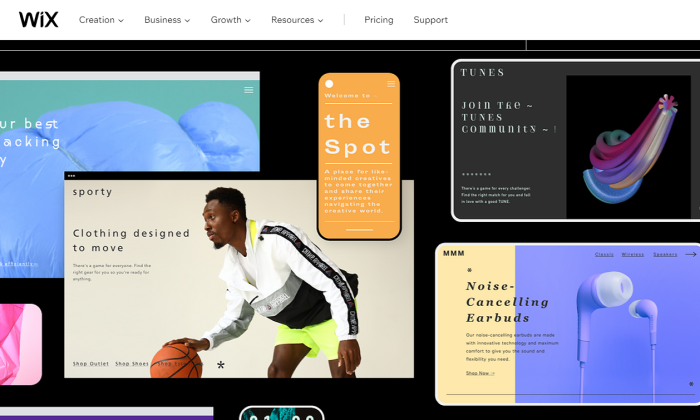
Wix stands out as one of the simplest website builders on the market, catering to non-technical users seeking to create websites from scratch. Its intuitive drag-and-drop interface enables users to effortlessly add elements and manage content without any coding requirements.
Key Highlights of Wix:
- Offers 500+ free templates
- Optimized for SEO and mobile responsiveness
- Enables creation of password-protected membership pages
- Provides eCommerce capabilities with product pages and payment acceptance
- Includes blog management tools and free hosting
Wix's versatility and user-friendly features make it a popular choice across various industries, from small businesses to online stores. Pricing starts at $14 per month.
#2 – Squarespace Review — Perfect for Creative Professionals
Squarespace distinguishes itself as an all-in-one website builder renowned for its stunning designs and customizable templates. Ideal for creative professionals, Squarespace offers free domain registration for the first year and features such as eCommerce capabilities, built-in marketing tools, and 24/7 customer support.

Starting at $12 per month, Squarespace provides an intuitive platform for managing portfolio sites and creative projects.
#3 – Shopify Review — Tailored for Ecommerce Websites
For those venturing into the world of online stores, Shopify emerges as a leading choice for eCommerce-specific CMS needs. Boasting an array of features such as product management, marketing tools, and 24/7 support, Shopify caters to businesses of all sizes looking to sell products online.
With plans starting at $29 per month and a 14-day free trial, Shopify offers a scalable solution for online retailers.
#4 – WordPress Review — The Pinnacle of CMS Platforms
Powering 38% of the Internet, WordPress stands as the most popular CMS globally, accommodating personal blogs and large-scale websites alike. With a vast library of plugins and customizable designs, WordPress offers unparalleled flexibility for users of all technical backgrounds.
Key Features of WordPress:
- Customizable designs and mobile responsiveness
- SEO-friendly structure
- Robust media management tools
While WordPress lacks dedicated support, its active community and extensive plugin repository provide ample resources for users seeking to enhance their websites.

#5 – Drupal Review — A Robust WordPress Alternative
Drupal serves as a free and open-source CMS known for its advanced content management capabilities and suitability for diverse industries. With features like content authoring, marketing automation, and robust security measures, Drupal appeals to developers and marketers seeking a versatile CMS platform.
For users desiring open-source functionality beyond WordPress, Drupal offers a viable alternative for content management.
#6 – TYPO3 Review — An Enterprise-Class CMS Solution
TYPO3, though less familiar, serves as an enterprise-class CMS favored by global corporations and European websites. Recognized for its scalability, multilingual support, and high-speed performance, TYPO3 caters to organizations with complex content management requirements.
While TYPO3 may not be as user-friendly as other CMS options, its robust features make it a compelling choice for enterprises and multinational companies.
Key Factors to Consider When Choosing a CMS
When evaluating different CMS platforms, several crucial factors should guide your decision-making process:
Usability
Ensure the CMS is user-friendly, especially for non-technical users who may be managing content.

Security
Choose a CMS with built-in security features or the ability to integrate third-party security plugins.
SEO
Opt for a CMS that includes SEO tools or supports third-party plugins for enhancing search engine optimization.
Support
Consider the availability of technical support options, particularly for open-source CMS platforms.
Custom Capabilities
Determine the level of customization offered by the CMS and whether it aligns with your website's needs.
Final Thoughts
With an array of CMS options available, selecting the right platform hinges on your specific requirements and preferences. While Wix, Squarespace, Shopify, WordPress, Drupal, and TYPO3 emerge as top contenders, your choice should align with your website goals and user experience preferences.
Explore the features and pricing of each CMS, leverage free trials, and consider your long-term scalability needs before making a decision. By choosing a CMS that suits your unique needs, you can streamline website management and enhance user experience effectively.

Frequently Asked Questions
What is the difference between marketing and advertising?
Advertising is a communication method that promotes products or brands. Advertising is usually accompanied by a clear call for action, such “Buy Now!” Click here or “Buy Now!”
Marketing is, on the contrary, a way to communicate your company’s mission, vision and values to potential clients. Marketing helps you build relationships with your current customers as well as prospects.
For instance, if you sell shoes online, you may use marketing to tell your story about who you are and what you offer. You could talk about your history, philosophy, and commitment to quality. Perhaps you could give testimonials from happy customers. You could even organize an event in which you give away shoes for free to encourage people to visit you website.
Marketing is simply telling stories. Advertising is about selling goods.
What is the role of marketing in a business strategy?
Marketing is an essential part to any business strategy. Without marketing, no one will know what your company has to offer. Marketing without sales would be pointless. Therefore, marketing is crucial to any business strategy.
However, not everyone is aware of the importance and value of marketing. Marketing is not just about spending money on advertising campaigns. Marketing encompasses much more than this. Marketing is everything you do to promote your company's brand and position in the market.
As you consider your business, think of these questions: What image do I want to project? How will my customers perceive me? How should I portray myself to the outside world?
If you don’t know the answers to these questions, you probably haven’t considered marketing.
Why is it so important to define your brand?
Your company can simply call it a brand. A brand promises benefits and certain qualities that will distinguish your company from others. Your brand is what makes you stand out from other companies in your industry.
A brand can give you authority and credibility. Potential customers instantly recognize your company's logo when they see it. They trust you because you've earned their respect.
Your brand is also an expression of your company's culture. Your brand will reflect the passion of your employees for your product/service.
Your brand is not just words and images. It is a promise your company keeps. It is a promise that you will provide value for your customers.
There are several things you should consider when developing your brand. First, you need to choose a name which clearly describes the company's mission. Sweet Dreams Bakery, for example, would be a great name for a bakery. If you run a software business, however, you would probably choose DreamSpark Software.
Next, think about how your brand will look. Will you use a recognized symbol? Will you use colors that match your corporate look? Will you use logos?
Finally, consider the perception of your brand by your target audience. Do you present yourself as helpful and friendly? Will you appear professional and trustworthy? Will you seem knowledgeable and experienced?
These are all questions you need to answer before building your brand.
What amount should I budget to fund my first digital marketing campaign
It all depends on the campaign you launch. You can spend $50 to $100 on your first campaign.
You can purchase advertising space on search engines like Google and Bing to get started. These ads are usually $10 per click.
Banner ads can be placed anywhere on your website that you own. This will attract new visitors to your site and help them return.
You can also find a freelancer that will design your banners. Freelancers typically charge between $20 and $30 per hour.
Once you have created your first advertisement, you can start tracking results. There are many analytics tools available for free on the Internet.
Data can also be tracked manually. You can use a spreadsheet to keep track of each metric, such as impressions, clicks, and impressions.
This data will allow you to determine if your campaign was successful.
If that is the case, you can still try different methods to find one that works.
Statistics
- Meanwhile, a PartnerPath poll found that co-marketed ads help 68% of consumers arrive at a buying decision before even speaking to a salesperson. (influencermarketinghub.com)
- This allows us to deliver CPCs that are 80% less than average and CTRs 4-5 times higher than average. (marketinginsidergroup.com)
- Today, 81% of brands around the world have affiliate programs. (influencermarketinghub.com)
- Many experts recommend you share 20% of your promotional content and 80% of other valuable content you find. (marketinginsidergroup.com)
- 81% of brands employ affiliate marketing, and eCommerce sites are particularly good candidates. (blog.hubspot.com)
External Links
youtube.com
hubspot.com
statista.com
influencermarketinghub.com
How To
How can I find out if my brand efforts are successful?
Ask your customers. It is the best way of measuring your success. Ask them to rate your brand. What do they like most about your company? What do they dislike? How can you improve?
You can also conduct surveys on social media sites like Facebook and Twitter. You can simply ask your followers how they rate your brand. Next, analyze the results to find out which aspects of your brand have been most successful.
Review sites are another option. When they are satisfied or dissatisfied with a company, people love to express their opinions. Take the time to read these comments and understand what they think about your brand.
Here are some tips to help you improve your brand.
- Be consistent. You shouldn't update your marketing materials each time you introduce a new product. You should keep your message consistent across all channels.
- Multiple channels are a good thing. To promote your brand, you should use email, social media, websites, and other digital communication channels.
- You must ensure that you give your customers exactly what they need. If you offer free shipping, make sure you deliver on that promise. You could lose customers who expect easy delivery.
- Remember, your brand is more that a logo. Your company's brand is everything. Make sure you have a balanced image.
- Get feedback from your customers. You'll benefit more if your customers give feedback as soon as possible.
- Test different messages. One message may work better than the other. You might have two messages that are very similar, but one receives more responses. It doesn't matter what, it is important to monitor your stats and see which message is doing the best.
- Look for ways to improve your brand. Do you have any ideas for improvement? You might add more videos to the website. Perhaps you could add more customer testimonials to your blog posts.
- You need to create a plan. Once you have determined your goals and objectives you need to create a strategy for achieving them. This includes setting a timeline for each objective. This also includes setting up milestones that will help you track your progress.
- Measure your results. As soon as you reach your goal, stop measuring. Instead, set up a system to monitor your performance over time. You'll know whether you are making steady progress towards your ultimate goal.
- Repeat! Now that you've established a solid foundation for your brand, you'll want to continue to build upon it. Consider hiring someone to help you if your marketing efforts aren't keeping up.
- Be positive. Negative feedback should be taken seriously, but not ignored. Instead, look at how you can improve your brand using this information.
- Use technology to your advantage. Technology has given us many tools we didn't even dream of before. So, why not use them to your advantage? You could, for example, create a mobile application for your brand.
- Think outside the box. It's okay to try something new. Just don't do it without thinking first.
- Have fun. Marketing is not supposed to be stressful. It's often referred to as “fun marketing.” It's important to enjoy your work.
- Know when to quit. When you feel like you've done all you can, it's okay to call it quits. You shouldn't give in too quickly. Sometimes you have to stick with it until you achieve the desired outcome.
- You must not forget about consistency. Consistency is key for success. Make sure you have a plan in place for your brand.
- Be patient. You will take time to build a successful brand. And, it won't happen overnight.
- Keep learning. Marketing is always changing. Marketing is constantly changing. Make sure to keep up with the latest developments by reading blogs and participating in webinars.
- Never stop improving. Even after you reach your goal, there are still things you can learn.
- Enjoy the journey. Marketing is fun. Marketing shouldn't be a chore.
————————————————————————————————————————————–
By: 2930
Title: Top Content Management Systems for Building Websites
Sourced From: internetlib.org/best-content-management-systems/
Published Date: 7/14/2021 3:08:07 PM