
WordPress plugins play a crucial role in making your website faster, increasing traffic, and enhancing website security for your visitors. However, it's essential not to go overboard with plugins as installing too many can slow down your site and lead to conflicts. Here, we'll explore the top seven WordPress plugins that can significantly improve your site's performance.
WP Rocket Review – Enhancing Speed Optimization
WP Rocket is a powerful caching plugin designed to optimize your website's speed and performance. It proactively builds your website cache, resulting in immediate performance enhancements. With features like page cache, gzip compression, and cache pre-loading, WP Rocket ensures faster loading times and reduced bounce rates. Priced at $49 annually per site, WP Rocket stands out as a top choice for speed optimization.
Yoast SEO Review – Boosting Organic Traffic
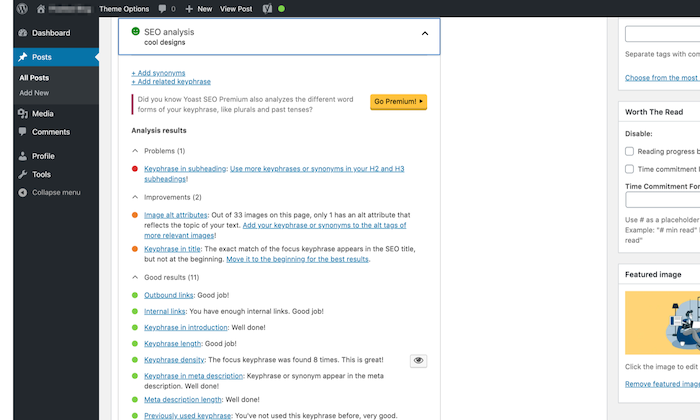
Yoast SEO is a trusted tool for enhancing search optimization and content readability. By selecting a keyword, Yoast SEO optimizes your page around it while providing real-time page analysis. The premium version, priced at $89 per year, offers additional functions to optimize content up to five keywords, among other benefits.
Akismet Review – Combatting Spam
Akismet is the go-to solution for eliminating spam comments effectively. Developed by Automattic, the plugin learns and improves over time to filter out spam comments. While the plugin is free to download, an Akismet.com API key is required for usage, with free keys available for personal blogs.
Wordfence Security Review – Ensuring Website Security
Wordfence Security is a robust firewall and security scanner plugin that safeguards your site from malicious threats. With features like malware detection, web application firewall, and login security options, Wordfence provides comprehensive security protection. The premium plan, priced at $99 per year, offers additional security features and professional support.
UpdraftPlus Review – Reliable Site Backup
UpdraftPlus is a user-friendly backup plugin that allows you to schedule automatic backups and store files on remote locations. With features like easy restoration, advanced reporting, and backup scheduling, UpdraftPlus ensures your website data is secure. The premium version, priced between $195-$399 annually, offers enhanced features and storage options.

MonsterInsights Review – Effective Data Tracking
MonsterInsights facilitates Google Analytics integration within your WordPress dashboard, providing key insights for improving your website performance. With features like active session tracking, conversion statistics, and revenue monitoring, MonsterInsights enables data-driven decision-making. The free version offers basic analytics, while the premium version, starting at $99.50 per year, provides advanced tracking and reporting features.
WPForms Review – Seamless Contact Form Design
WPForms simplifies the creation of appealing contact forms using its drag-and-drop builder. With features like conditional logic and integration with marketing platforms, WPForms enhances user experience and lead generation efforts. While the free plan offers secure contact form creation, the paid version, starting at $39.50 per year, provides access to advanced features and templates.
Factors to Consider When Choosing WordPress Plugins
When selecting WordPress plugins for your website, consider factors like free vs. premium options, overall plugin ratings, user reviews, support availability, update frequency, and active installations. By evaluating these factors, you can choose plugins that best suit your website's requirements and ensure optimal performance.
In conclusion, leveraging the right WordPress plugins can significantly enhance your website's functionality and user experience. Explore the recommended plugins mentioned above to take your site to the next level.
If you have a favorite plugin that wasn't mentioned, feel free to share in the comments!
—Neil Patel

Frequently Asked Questions
Why is it so important for your brand to be defined?
Your company can simply call it a brand. A brand promises specific qualities and benefits that make your company stand apart from other companies. Your brand is the thing that makes you different from other companies within your industry.
A brand gives you credibility and authority. Your logo instantly identifies your company to potential customers. You have their trust because they respect you.
Your company's culture can also reflect your brand. Your brand is likely to reflect your passion for your product/service if your employees are passionate about it.
Your brand isn't just words or pictures. It's a promise to which your company lives up. It's your promise to give value to your clients.
There are many things to think about when creating your brand. First, choose a name that is clear and concise. Sweet Dreams Bakery is a good example of a bakery name. If you run a software business, however, you would probably choose DreamSpark Software.
Next, consider how your brand will be presented. Will your logo be easily identifiable? Will your colors match your corporate identity? Are you going to use logos?
You'll also want to think about how your target audience sees your brand. Do you present yourself as helpful and friendly? Will you be trustworthy and professional looking? Will you be able to demonstrate your expertise and knowledge?
These are all important questions you should ask before building your brand.
What are the four functions of marketing?
Marketing is the art or creating demand for products and/or services.
It provides information about the organization's offerings and values, as well as how they impact customers' lives.
Marketing is also a way to stimulate interest and increase awareness about an offering. It can even drive action (or purchasing) when an invitation is issued.
The four functions of marketing include:
- In order to create demand, you must build relationships with potential buyers in order to convince them that there is value buying your product or services.
- Stimulating Interest – This involves increasing consumer awareness of your product or service.
- Building Awareness – This refers to making sure consumers are familiar with your product and services, as well as why they might be interested in buying them.
- Driving Action – This means ensuring that consumers make purchases after becoming aware of your product or services.
Are there any risks associated with digital marketing?
Yes, there are several risks involved in digital marketing.
You must first protect your online reputation through being cautious about what you share on social media.
You must also ensure that your content is original and doesn't infringe upon any other intellectual property rights.
You also risk losing control over your brand image if your online presence is not monitored closely.
Finally, identity theft can occur if you give your permission for someone to use your personal information.
How to protect your online reputation
- Pay attention to what you post on social networks
- Ensure All Content Is Original And Does Not Infringe On Anyone Else's Intellectual Property Rights
- Monitor Your Brand Image
- Use strong passwords
- Use personal details only with permission
- Report Any Unauthorized Activity Immediately
- Don't Post Photos Of Yourself Or Others In A Disturbing Way
- Never divulge your Social Security Number
- Keep up-to date with the latest news
- Stay Away from Scams
- Choose a Secure Password
- Always keep an eye out for new updates
- Don't Share Too Much Information
- Pay attention when you give out credit card numbers
- Do Not Send Money Through E-Mail
- Look out for fake websites
- Bad reviews can be a big problem for your business
- Regularly Check Your Credit Reports
- Keep an eye on your privacy settings
- Ask someone who really knows you before you share something.
What is an example of search engine marketing?
Search Engine Marketing (SEM), is an essential component of digital marketing. SEM encompasses paid-per click advertising, sponsored link, display ads (paid inclusion), search engine optimization(SEO), social marketing, video marketing and mobile advertising.
What is the difference between marketing and advertising?
Advertising is communication that promotes brands or products. Advertising has a clear call of action. For example, “Buy now!” Or “Click Here.”
Marketing is, on the contrary, a way to communicate your company’s mission, vision and values to potential clients. Marketing can also help build relationships between current and potential customers.
You might use marketing to tell the world about yourself and your products if you sell footwear online. You might talk about your background, philosophy, or commitment to quality. You might share customer testimonials. Perhaps you can even hold an event where people are encouraged to visit your website by giving away free shoes.
Marketing is, in short, about telling stories. Advertising is about selling products.
Statistics
- Meanwhile, a PartnerPath poll found that co-marketed ads help 68% of consumers arrive at a buying decision before even speaking to a salesperson. (influencermarketinghub.com)
- Today, 81% of brands around the world have affiliate programs. (influencermarketinghub.com)
- 81% of brands employ affiliate marketing, and eCommerce sites are particularly good candidates. (blog.hubspot.com)
- From 2020 to 2022, eMarketer predicts that digital marketing will grow by 36% and take up 54% of marketing budgets! (marketinginsidergroup.com)
- In 2017, 34% of marketers cited co-branding as the most effective way to increase the number of email subscribers. (influencermarketinghub.com)
External Links
neilpatel.com
moz.com
- SEO Learning Center Moz
- [Case study] How we ranked #1 in a high-volume keyword in under 3 months – Moz
influencermarketinghub.com
blog.hubspot.com
How To
When creating content for online marketing, ensure it's relevant to your audience. Your audience won't care if you don't offer your product or service. Why would they care about your blog content?
Consider fashion accessories as an example. Make sure that you have relevant content. Not general web design tips.
Use social media platforms such as Facebook, Twitter, LinkedIn, and Instagram as an effective way to promote your business. Businesses can use social media platforms to communicate with customers and share information.
You also have the opportunity to make connections with current and potential clients via social media.
Content that encourages sharing with friends and engages users is a good idea. Shared content increases your site's visibility and traffic.
Regular updates are a great way to keep your content updated. It is better to post daily or weekly than once a month.
Posted content is more popular because readers expect new content.
Your content should contain links to your homepage. This helps visitors find additional resources on your site.
Make sure that your content is mobile-friendly Mobile devices now outnumber desktop computers. According to a recent survey more than half of internet users access websites via smartphones.
It is important to test it on different mobile and tablet browsers in order to ensure that the content appears well on small screens. Mobile-first should be a top priority for any developer or website owner.
It's more than aesthetics. Mobile websites convert better than desktop ones. Because they are smaller, they can be easier to navigate and load quicker.
Your audience will value your content.
————————————————————————————————————————————–
By: 2961
Title: The 7 Best WordPress Plugins for Your Website
Sourced From: internetlib.org/best-wordpress-plugins/
Published Date: 7/15/2021 5:20:17 PM